Internet Jargons

HTTP-
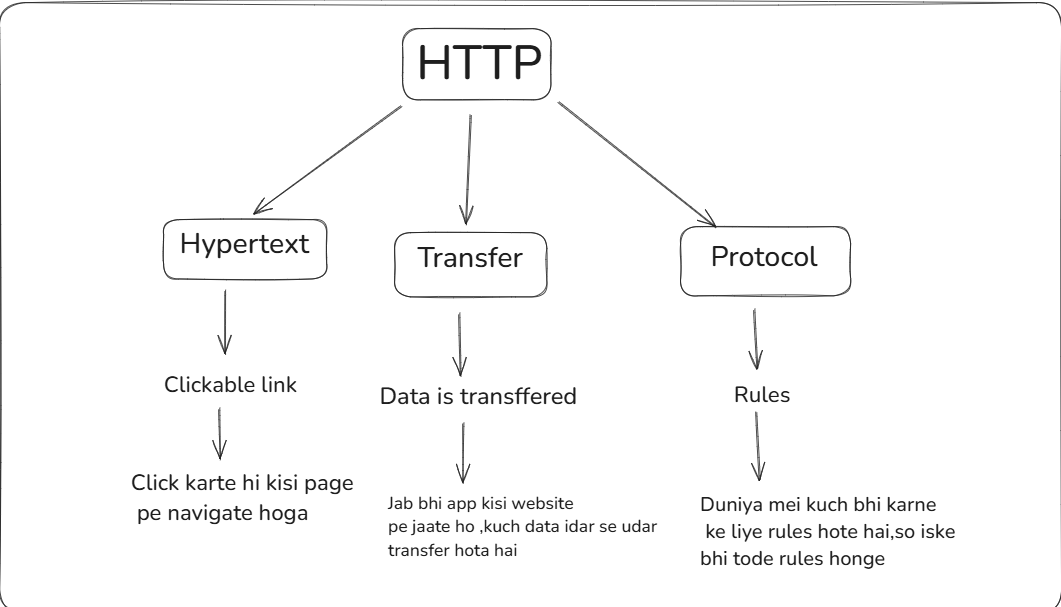
Client Request:
Jab tum apne browser me URL type karte ho (jaisehttps://google.com), browser (client) server se ek HTTP request bhejta hai.Server Response:
Server tumhare request ko process karta hai aur HTML, CSS, JavaScript ya kisi file/data ka response HTTP ke through wapas bhejta hai.Data Transfer Format:
HTTP ke andar HyperText (HTML pages) ya kisi bhi type ka data (JSON, XML, images, videos) transfer ho sakta hai.
Ye data packets ke form me bheja jata hai.
STATELESS PROTOCOL
HTTP IS A STATELESS PROTOCOL
Aise samaj lo jab bhi tum kisi website pe jaate ho tab tum ek new USER ban jaate ho
example-Socho ek dhabha (server) hai jisme tum customer (client) ho. Agar dhabha stateless hai, to har baar tum khana order karte ho, tumhe apna pura order aur details baar-baar batani padti hai. Dhabha tumhara pehle ka order yaad nahi rakhta.
QUESTION?
Agar har aise hi chalega toh kaise koi bookmarks jaise cheeze kaam karti hai?
Iske ayye humhare paas SESSIONS aur COOKIES
COOKIES and SESSIONS
Cookies:
Cookies chhoti files hoti hain jo client-side (browser) me store hoti hain aur user-specific data rakhti hain, jaise login status ya preferences.
Kaise Kaam Karti Hain Cookies?
Jab tum login karte ho (e.g., Gmail), server ek cookie generate karta hai aur tumhare browser me save kar deta hai.
Jab tum dobara request bhejte ho, browser wo cookie server ko bhejta hai.
Server cookie ko dekh kar samajh jata hai ki ye kaun user hai aur uska session continue karta hai.
Example:
Tum
www.amazon.inpar visit karte ho aur "Add to Cart" karte ho. Amazon tumhari cart ki information ko ek cookie ke through browser me store karta hai.Jab tum wapas jaate ho, cart ki details waise ki waise milti hain.
Types of Cookies:
Session Cookies: Temporary cookies jo tab tak active hoti hain jab tak browser band nahi hota.
Persistent Cookies: Long-term cookies jo expiry date ke saath aati hain (e.g., "Remember Me" option).
Secure Cookies: Sirf HTTPS connection par kaam karti hain.
Sessions:
Sessions server-side par user-specific data store karte hain. Jab tak user active hai, tab tak session valid rehta hai.
Kaise Kaam Karta Hai Session?
Jab tum login karte ho, server ek session ID generate karta hai aur usse server-side par store karta hai.
Ye session ID client ko bhej diya jata hai (usually cookie ke through).
Jab client dobara request bhejta hai, session ID ke basis par server user ko identify karta hai.
Example:
Tum kisi banking website par login karte ho. Server tumhare account ke session data ko maintain karta hai.
Agar tum kuch der tak active nahi ho, session expire ho jata hai for security.
HTTP HEADERS
Socho tum post office (client) se ek parcel bhej rahe ho (HTTP request).
Parcel ke upar likhi information HTTP headers ki tarah hai, jo receiver (server) ko batata hai ki parcel kahan jaana hai aur uska nature kya hai (fragile, urgent, etc.).
In case of browser voh info hoga
Client kon hai?
Browser info
Date and Time
REQUEST -RESPONSE MODEL (MODEL BAS FUN KE LIYE LIKH DIYA GAYA HAI)
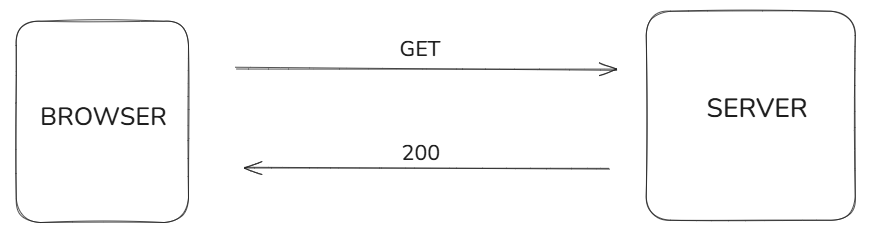
Socho tum ek restaurant me waiter ko (server) order karte ho:
Tum (client) waiter ko bolte ho: "Mujhe ek pizza chahiye" (request).
Waiter kitchen (server) me jata hai, order prepare hota hai.
Waiter tumhe pizza wapas laata hai (response).
Yahi kaam client-server communication me hota hai.
Request-Response Cycle Steps:
Client Request Send Karta Hai:
Client server ko kuch data bhejta hai (e.g., URL, method, headers, body).
Example: Browser se "Google.com" open karte ho.
Server Request Receive Karta Hai:
Server request ko analyze karta hai aur decide karta hai ki response kya bhejna hai.
Example: Google ka server tumhare query ko samajhta hai.
Server Response Bhejta Hai:
Server client ko data (e.g., HTML page, JSON data) bhejta hai.
Example: Google ka search result HTML page ke form me wapas aata hai.
Sure! Let’s explain User-Agent, TCP, IP, URL, DNS, Header, Payload, Cache in an easy-to-understand way, following the same style with real-life examples and technical context.
1. User-Agent
User-Agent ek HTTP header hai jo client ke software aur hardware ka detail batata hai (browser kaunsa hai, operating system kya hai, etc.).
Example in Real Life:
Socho tum ek form bhar rahe ho aur batate ho:
"Main mobile se aaya hoon (Android)"
"Mera browser Chrome hai."
Technical Example:
Request header me User-Agent kuch aisa hota hai:
User-Agent: Mozilla/5.0 (Windows NT 10.0; Win64; x64) Chrome/110.0
Yeh server ko batata hai ki tum Chrome browser se Windows OS ka use kar rahe ho.
2. TCP (Transmission Control Protocol)
TCP ek protocol hai jo data ko reliable tareeke se deliver karta hai. Iska kaam hota hai data ko packets me todna aur fir sahi order me reassemble karna.
Example in Real Life:
Socho tum courier bhej rahe ho aur fragile items alag-alag boxes me pack karte ho. Har box pe number likhte ho (packet number) aur ensure karte ho ki saare boxes customer tak sahi order me pahunchein.
Technical Context:
TCP packets me error-checking aur acknowledgment hota hai:
"Packet 1 pahunch gaya."
"Packet 2 resend karna hai."
3. IP (Internet Protocol)
IP address ek unique identity number hai jo har device ko internet pe assign hota hai, taki devices ek dusre ko locate kar sakein.
Example in Real Life:
Tumhara ghar ka address IP address ki tarah hai. Courier delivery ke liye tumhara address zaruri hai.
Technical Example:
IPv4:
192.168.1.1IPv6:
2001:0db8:85a3:0000:0000:8a2e:0370:7334
4. URL (Uniform Resource Locator)
URL ek web address hai jo batata hai ki internet pe resource kahan available hai.
Example in Real Life:
Socho tum ek restaurant ka menu padhte ho:
Restaurant ka address =
www.example.comDish ka section =
/menu/pizza
Pura URL:https://www.example.com/menu/pizza
Technical Example:
URL ka structure hota hai:
https://www.example.com:443/path/to/page?query=search
https://= Protocolwww.example.com= Hostname/path/to/page= Specific resource?query=search= Query parameters
5. DNS (Domain Name System)
DNS ek internet phonebook ki tarah hai jo domain names (e.g., google.com) ko IP addresses (e.g., 142.250.190.46) me convert karta hai.
Example in Real Life:
Socho tumhare phone me contacts saved hain. Tum "Mom" search karte ho, aur phone unka actual number dial karta hai.
Technical Example:
DNS query:
Client: "google.com ka IP address kya hai?"
DNS Server: "142.250.190.46"
6. Header
Header me metadata hoti hai jo client aur server ke beech communicate hoti hai (e.g., content type, authentication token).
Example in Real Life:
Parcel ke upar likhi cheezein (e.g., address, fragile, delivery type) header ki tarah hoti hain.
Technical Example:
Headers in a request:
GET /index.html HTTP/1.1
Host: www.example.com
User-Agent: Mozilla/5.0
7. Payload
Payload request ya response ka actual data hota hai jo client aur server ke beech transfer hota hai.
Example in Real Life:
Courier ke box ke andar ka saman (e.g., ek book) payload hai. Header batata hai box ka detail, aur payload uske andar ka content.
Technical Example:
HTTP Request:
POST /api/login HTTP/1.1
Host: www.example.com
Content-Type: application/json

{
  "username": "john_doe",
  "password": "123456"
}
Payload = {"username": "john_doe", "password": "123456"}
8. Cache
Cache ek temporary storage hai jo frequently accessed data ko store karta hai, taki agle request me fast response mile.
Example in Real Life:
Socho tum ek shop se daily samaan lete ho aur shopkeeper tumhare liye ek fixed list bana leta hai, taki har baar tumhe explain na karna pade.
Technical Context:
Browser cache:
Tumne pehli baar ek image download ki:
image.jpgBrowser usko cache me store kar leta hai.
Agli baar wahi image fast load hoti hai.